
Excluding Files from a List in Terraform

Saturday, Oct 10, 2020 | 2 minute read

Ricardo Ferreira

Since the introduction of the for_each feature in Terraform 0.12 it is now possible to code powerful constructs to express the logic of your infrastructure. But sometimes you have to use some creativity to use this feature. I recently had to write a Terraform code that could upload all the JavaScript files from a local folder into a storage blob in Azure. But one of these files would have some template expressions so I wanted to upload all the files from the local folder except that one — because I would upload it individually.

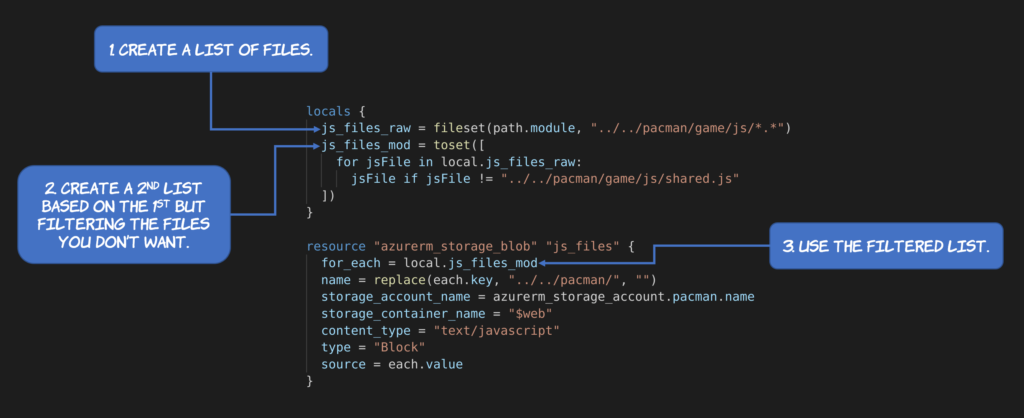
After some time digging I ended up with a very elegant solution. First I created a variable to hold the original list of files. For this I used the fileset function.

js_files_raw = fileset(path.module, "../../pacman/game/js/*.*")

Then I created a secondary variable to represent all the files from the previous list except the one(s) that I would like to exclude. To exclude the unwanted files I created a for loop block to iterate over all the items of the list and negate the ones that I don’t want.

  js_files_mod = toset([
    for jsFile in local.js_files_raw:
      jsFile if jsFile != "../../pacman/game/js/shared.js"
  ])

Note the usage of the toset function to explicitly create a set of strings out of the array. Finally I could simply reference the mutated variable from the resource that would upload the files to the storage blog.

resource "azurerm_storage_blob" "js_files" {
  for_each = local.js_files_mod
  name = replace(each.key, "../../pacman/", "")
  storage_account_name = azurerm_storage_account.pacman.name
  storage_container_name = "$web"
  content_type = "text/javascript"
  type = "Block"
  source = each.value
}

Here is a summary of all the steps:
I hope that help if you find yourself in the same situation that I did 🙂
© 2018 - 2026 Ricardo Ferreira

Search is powered by Pagefind. Just hit CTRL+K or CMD+K to start searching.

Powered by Hugo with Dream and Devrel themes.

Open Source

I contribute to LangChain4j, an idiomatic open source Java library for building LLM-powered applications on the JVM. Recent work includes adding native vector search embedding stores so developers can build RAG, recommendation engines, and AI memory systems.

I also ported RedisVL to Go, an open source, AI-native client that brings vector search, semantic caching, LLM memory, semantic routing, rerankers, and an MCP server to the Redis ecosystem for Golang developers.

Speaking

I’ve been speaking at conferences since 2008 and doing it full time as part of my work since 2018. Some of the events I’ve spoken at include AWS re:Invent, Microsoft Ignite, Google Cloud Next, KubeCon, Oracle OpenWorld, QCon, Strange Loop, Kafka Summit, Pulsar Summit, JavaOne, DevNexus, JFokus, JNation, and All Things Open.

Recordings of my talks live on my YouTube channel, and the code I write for talks, demos, and tutorials is on my GitHub.

Who am I?

I work at the intersection of distributed systems, AI, and data infrastructure, turning complex technology into things developers can understand, adopt, and build with.

Lately, that means hands-on AI engineering: building vector search, semantic caching, agent memory, and RAG into the data layer; contributing to LangChain4j and RedisVL for Golang; and figuring out how to make AI agents secure enough to ship.

The AI-native work isn’t a pivot. It draws on the same systems-design foundation I’ve built for 20+ years, moving data fast, at scale, close to compute, watching where systems break; now applied to vectors and agents. I have worked on event streaming with Apache Kafka and Flink at AWS and Confluent; observability at Elastic; as well as RDBMS, NoSQL, and Big Data at Oracle. That foundation is exactly what separates AI demos that work on stage from AI systems that survive production.

Social Links